
Garmin G3X Compatible

Sync Checklists Directly to Your Garmin Avionics

The ONLY iOS app that creates and edits .ace files for Garmin G1000 and G3X Touch panels. No Windows laptop or Garmin's clunky ACE Editor required - just your iPhone/iPad and an SD card. Works with real avionics AND flight simulators.

  • Create & edit checklists on iPhone/iPad - no laptop needed
  • Direct sync to Garmin G1000/G3X via SD card
  • Works with X-Plane, MSFS & real aircraft
  • No subscription fees - one-time purchase
ACE Checklist on Garmin Avionics
Checklists on Your Garmin Display
Garmin Compatible
ForeFlight Ready
📡
Works Offline

Sync Checklists from iPad to Garmin Avionics

The complete checklist solution for real aircraft and flight simulators. Create once, use everywhere - from your iPad to your G1000.

iOS Native

Built specifically for iPhone and iPad with intuitive touch controls

Direct Sync

Transfer checklists directly to your Garmin avionics via SD card

Real & Simulated

Works with actual aircraft and all major flight simulators

Safety First

Color-coded items, emergency procedures, and phase-of-flight organization

Works Offline

No internet required - perfect for hangar or cockpit use

Multiple Formats

Export to .ace, .fmd, PDF, or plain text for any system

Universal Format Support

Any system that supports .ace, .fmd, or text formats can use your checklists

All Garmin panels with SD card slots
ForeFlight & compatible EFB apps
Dynon & other text-based systems
Export to PDF for paper backup
Share via email or cloud storage
Import from any text source
Perfect for Virtual & Real Pilots

Export .ace Files to Any Aviation System

Whether you're flying a real aircraft or practicing in a simulator, ACE's universal file formats work everywhere. Simply export and transfer via SD card, email, or cloud storage.

📁

Simple File Management

Export checklists as .ace files and organize them in folders. Transfer via SD card to your Garmin avionics or simulator setup.

🔄

Universal Compatibility

Works with any flight sim using Garmin avionics - MSFS, X-Plane, P3D. Same .ace files work in both virtual and real cockpits.

☁️

Share & Sync

Email checklists to students, share with your flying club, or sync across devices using iCloud, Dropbox, or Google Drive.

Why Pilots Choose ACE

🔄

Direct Panel Sync

Transfer checklists straight to your Garmin G1000/G3X via SD card - no conversion needed

📤

8+ Export Formats

Export to .ace, .fmd, .txt, .pdf, .html, .json, .csv, .yaml - more formats than any other app

🌐

Universal Compatibility

One checklist works everywhere - iPad, iPhone, Garmin panels, ForeFlight, simulators

☁️

Seamless Sharing

Email to students, sync via iCloud, share through Dropbox - your checklists go anywhere

Join Thousands of Virtual Pilots

From PPL students practicing procedures to airline pilots staying current, ACE helps simulator pilots fly like the pros.

Works With Your Avionics

ACE Checklist Editor seamlessly integrates with the most popular aviation systems

Supported Garmin Avionics

Based on Garmin .ace file documentation

Certified/Experimental/LSA

G3X™ and G3X Touch™ glass cockpit suite

Modular glass cockpit for experimental and LSA aircraft

Integrated Flight Deck

G3000® avionics suite

With display software versions earlier than GDU™ display software version 20.x

Handheld Navigator

GPSMAP® 695 and GPSMAP® 696

Portable aviation GPS navigators

Portable GPS

aera® 796 and aera® 795

Learn how to create a checklist to use on the aera 795 or aera 796 with ACE-Editor

GPS Navigator

GTN™ series

Moving-map GPS navigator with software version 5.13 or higher

Integrated Flight Deck

Garmin Integrated Flight Deck (GIFD)

Includes G900X® / G950® / G1000® / G2000® / G3000® / G5000® flight decks with display software versions earlier than GDU™ display software version 20.x

Additional Compatible Systems

Garmin Avionics

Native ACE format support for all supported Garmin systems

ForeFlight

Import and export encrypted .fmd files seamlessly

Dynon SkyView

Full compatibility with proper line wrapping and formatting

Export to Any Format You Need

ACE supports extensive import and export capabilities to work with your entire aviation ecosystem

.aceACE Native
.fmdForeFlight
.txtPlain Text / Dynon
.mdMarkdown
.htmlHTML
.jsonJSON
.csvCSV
.yamlYAML

Safety-First Design You Can Trust

Designed with aviation safety standards in mind, ACE provides clear visual distinctions for different types of checklist items.

WARNINGCritical items highlighted in aviation yellow
CAUTIONImportant procedures in amber
NOTEHelpful information in gray

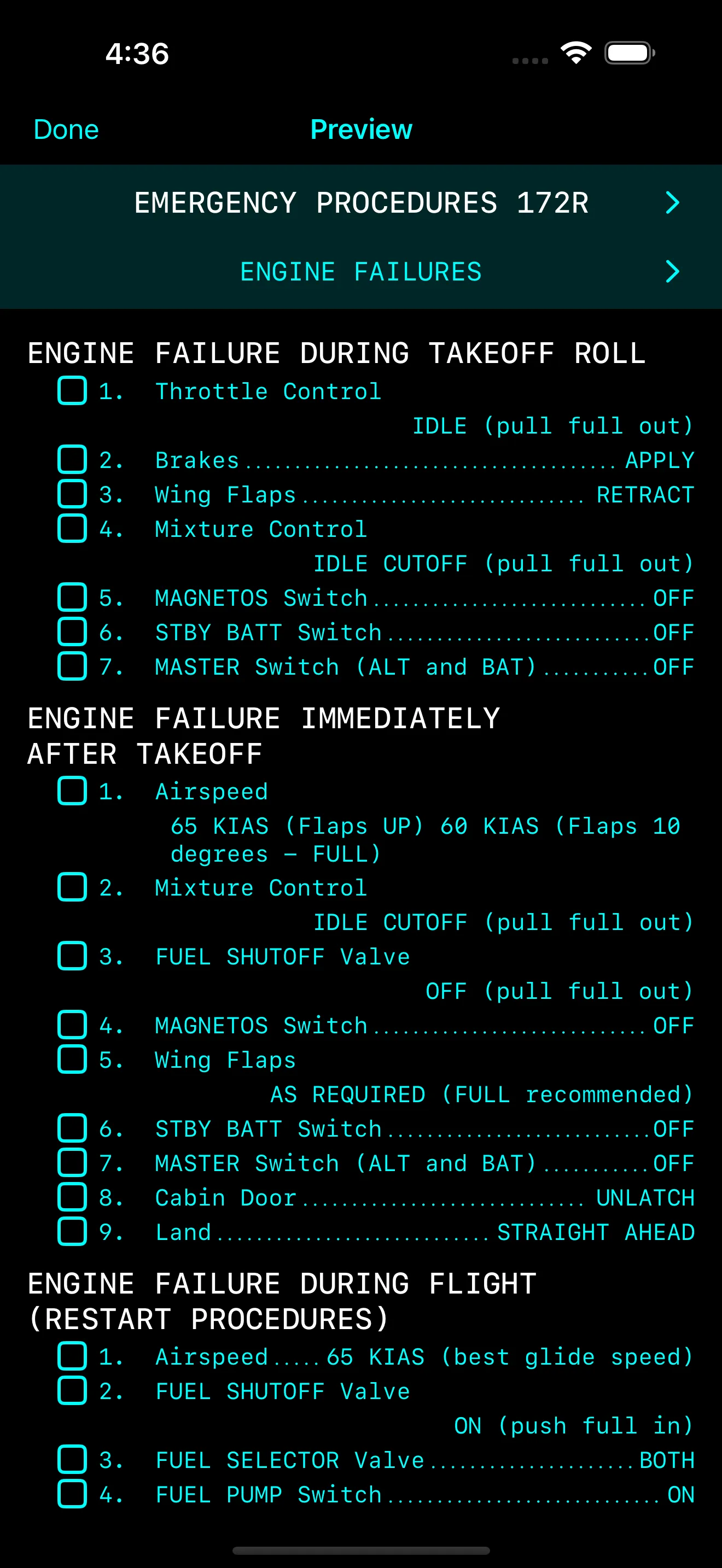
Quick Emergency Access

Emergency checklists are always one tap away with high-visibility formatting for critical situations.

ENGINE FAILURE IN FLIGHT
WARNING: Maintain aircraft control
AirspeedBEST GLIDE
Fuel SelectorSWITCH TANKS
CAUTION:Do not attempt restart below 1000 AGL

Trusted by Pilots Worldwide

See what professional pilots are saying about ACE Checklist Editor

"Finally! No more booting up Windows just to edit a checklist. This app is a game-changer for Garmin pilots."
Mike R.
Cirrus SR22 Owner
"Works flawlessly with my G3X Touch. The ability to color-code emergency items is brilliant."
Sarah T.
RV-10 Builder
"I use this for both my real Cherokee and X-Plane sim. Syncs perfectly to both."
James L.
CFI & Sim Enthusiast

Start Flying Safer and Smarter Today

Join thousands of pilots using ACE for professional digital checklists.
No subscriptions, your's forever.

Download on theApp Store

⚠️ Important Safety Notice

ACE Checklist Editor is designed to assist pilots but does not replace your aircraft's official Pilot Operating Handbook (POH) or FAA-approved flight manual. Always verify checklist items against your aircraft's official documentation. Every aircraft is unique with different equipment and STCs.